
Triggering an alarm with the SOS button
The physical alarm button is located on the top of the device and is clearly identifiable by its orange color and ‘SOS’ marking.
Press and hold the button for approximately 2 seconds to activate a panic alarm.
Types of alarms
Panic alarm
Manually activated via the SOS button. This alarm is intended for emergency situations where immediate assistance is required.
The panic alarm can also be activated via the red button in the X-Guard Alarm app on the device screen.
Assistance alarm
The assistance alarm is intended for situations where support is needed, but there is no immediate emergency.
This alarm can only be activated via the orange button in the X-Guard Alarm app. This button is not a physical button on the device.
Man-down alarm (RISK)
Automatically activated when the device detects no movement for 2 minutes, while the ‘Personal Safety’ mode is set to RISK.
How does RISK mode work?
When ‘Personal Safety’ is set to RISK:
-
The motion sensor is activated.
-
If no movement is detected for 2 minutes, a 30-second pre-alarm starts.
-
This can be cancelled by moving the device or tapping Cancel on the screen.
-
If no response occurs, an alarm is automatically sent.
Pause mode
If the device lies flat on the screen for 15 seconds (for example on a table), it automatically switches to pause mode.
In this mode, the man-down function is temporarily disabled.
Pause mode automatically ends once the device is picked up or moved again.
By default, a pause lasts a maximum of 1 hour.
After use
-
Place the device back in the charger or docking station.
-
Check that the device is charging correctly. A red LED on top of the device indicates charging. When the LED turns green, the device is fully charged.
-
When placed in the charger or docking station, the X-Guard app automatically switches ‘Personal Safety’ and ‘Receive Alarm Calls’ OFF.
-
When removed from the charger, the app automatically switches ‘Personal Safety’ to RISK and ‘Receive Alarm Calls’ to ON.
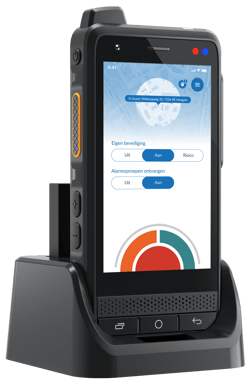
Technical specifications
General
-
Color: Black
-
Dimensions: 144.5 × 69.9 × 21.2 mm
-
Weight: 245 g (including battery)
Display & control
-
Display: 4.0-inch Incell IPS capacitive touchscreen, 800 × 480 px
Operating system & performance
-
Operating system: Android 15.0
Camera
-
16 MP rear camera and 8 MP front camera
Audio
-
Speaker: Front 3411 / 2.5 W stereo speaker
Connectivity
-
Network support: 2G, 3G and 4G
Battery & charging
-
Battery capacity: 4350 mAh Li-polymer battery, supports 15 W fast charging
Durability
-
Water and dust resistance: IP65
-
Drop resistance: withstands drops up to 1.8 meters